
Administrative Assistant Resume Examples, Skills & Template (2026)
See administrative assistant resume examples, skills, summaries, objectives, bullet points, and downloadable templates for entry-level and experienced roles.
Quick answer
A strong administrative assistant resume shows how you organize work, support people, and keep information moving.
Start with the administrative assistant job you are actually applying for. One role may focus on calendars, meetings, travel, and executive support, while another may lean more heavily on records, customer communication, data entry, office coordination, or basic bookkeeping.
Use the job description to decide which skills and responsibilities deserve the most attention. Then support the important ones with clear examples from your real experience instead of copying a generic administrative assistant job description into your resume.
- Prioritize the administrative responsibilities that are central to the target job.
- Name software and office systems only when you have actually used them.
- Use job-specific keywords naturally and connect important terms to evidence.
- Turn routine duties into clearer bullets that show scope, ownership, or outcome when you know it.
- Keep the layout simple enough for quick human review and ATS parsing.
On this page
Choose the administrative assistant resume example you need
Start with the example closest to your situation, then use the rest of the guide to tailor the wording, skills, and evidence to the job description.
Related
Accuracy rules for every administrative assistant resume example
The examples on this page are fictional. They are meant to show structure and level of detail, not give you facts to copy.
A resume is strongest when the wording is specific and every important claim can be explained in an interview.
- Keep official job titles and employment dates accurate.
- Do not turn customer service, volunteer work, or campus work into formal administrative employment.
- Name Excel, Outlook, a CRM, accounting software, or another system only when you have actually used it.
- Use numbers only when you know the real volume, time, team size, or result.
- Do not copy executive, legal, medical, or financial duties from another administrative specialty unless they were part of your work.
Entry-level administrative assistant resume example
This example uses customer service and volunteer coordination as transferable evidence instead of pretending the candidate already held an administrative assistant title.
Complete fictional example
Maya Patel
Use this as a structure reference. Replace every employer, date, skill, credential, tool, responsibility, and result with information that is true for you.
Header
Maya Patel Administrative Assistant Candidate | Austin, TX | maya.patel@example.com | (555) 010-1201
Objective
Entry-level administrative candidate with customer service experience, strong written communication, and hands-on use of Excel, Outlook, and shared calendars. Seeking to support scheduling, records, and day-to-day office coordination.
Skills
- Microsoft Excel and Word
- Outlook and shared calendars
- Data entry
- Customer communication
- Records organization
- Meeting support
Experience
- Customer Service Associate | Northside Market | Austin, TX | 2024-2026
- Handled phone and in-person questions, updated customer records, and routed requests to the right team.
- Maintained shift and service trackers in Excel and checked entries for missing information.
- Volunteer Office Support | Community Learning Center | 2025-2026
- Scheduled tutoring appointments, prepared sign-in sheets, and organized digital files for program staff.
Education
- Associate coursework in Business Administration | Austin Community College | Expected 2027
Certifications and training
- Microsoft Office coursework | Current
Why this works
- Uses transferable evidence without changing prior job titles.
- Shows software in context instead of as a long generic list.
- Keeps the objective focused on office support the candidate can already perform.
Administrative software that appears in current job postings
O*NET's employer-posting data for Secretaries and Administrative Assistants shows which software names appeared most often in linked U.S. postings during 2025.
These percentages are not a list of software every administrative assistant needs. Use them as market context, then follow the specific job description.
- Signal
- Microsoft Office
- Share or score
- 30%
- How to use it
- Useful when the posting asks for broad Office experience.
- Signal
- Microsoft Excel
- Share or score
- 28%
- How to use it
- Name Excel when you have used it for tracking, reporting, lists, or other real work.
- Signal
- Microsoft Outlook
- Share or score
- 19%
- How to use it
- Relevant for roles centered on calendars, email, meetings, and scheduling.
- Signal
- Microsoft PowerPoint
- Share or score
- 15%
- How to use it
- Include it when presentation or meeting-material work is part of your background.
- Signal
- Microsoft Word
- Share or score
- 10%
- How to use it
- Use it when document preparation or formatting is part of the job.
| Signal | Share or score | How to use it |
|---|---|---|
| Microsoft Office | 30% | Useful when the posting asks for broad Office experience. |
| Microsoft Excel | 28% | Name Excel when you have used it for tracking, reporting, lists, or other real work. |
| Microsoft Outlook | 19% | Relevant for roles centered on calendars, email, meetings, and scheduling. |
| Microsoft PowerPoint | 15% | Include it when presentation or meeting-material work is part of your background. |
| Microsoft Word | 10% | Use it when document preparation or formatting is part of the job. |
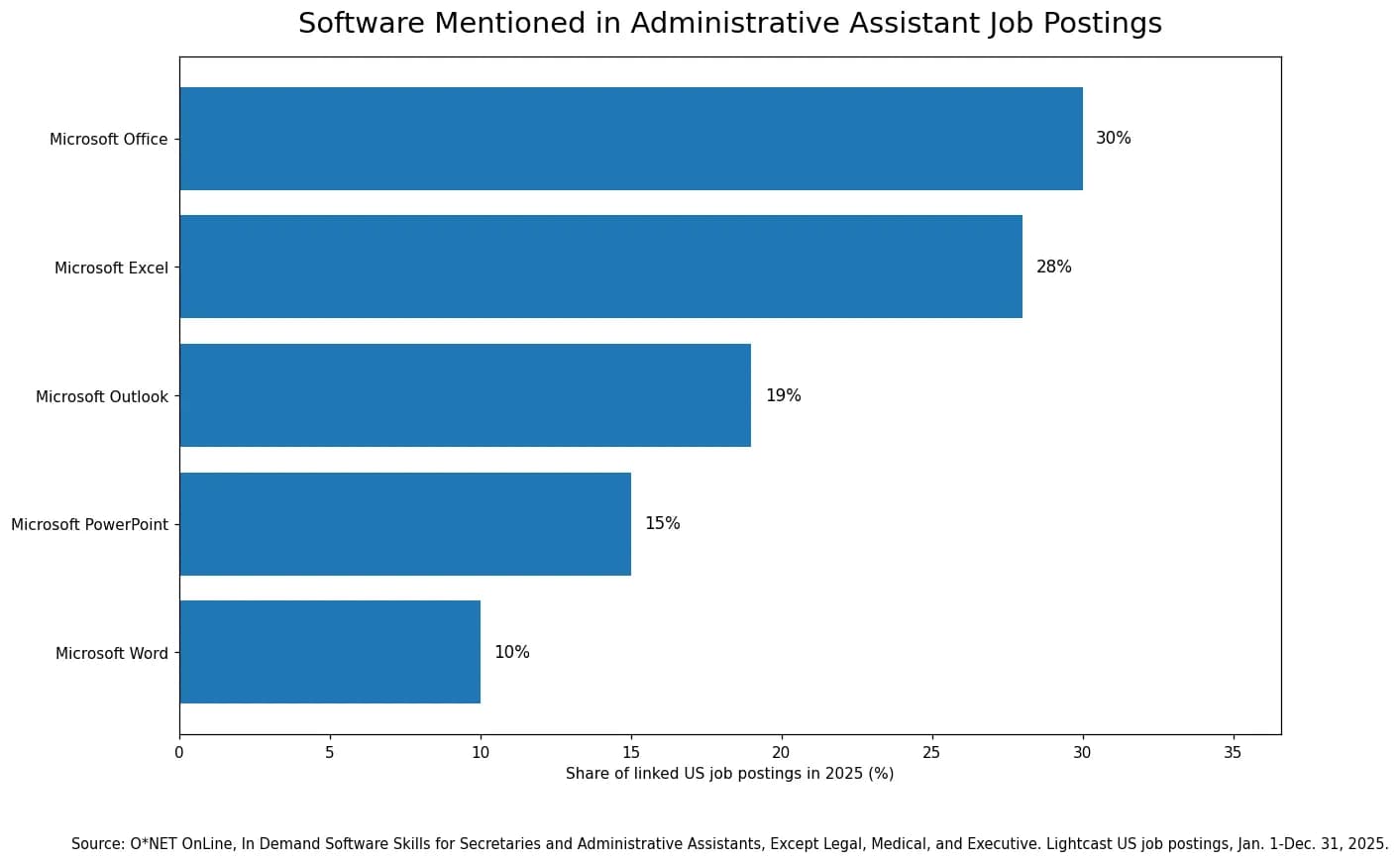
Source: O*NET OnLine employer-posting data using Lightcast U.S. job postings for 2025.
Download a administrative assistant resume template
These files use a simple one-column layout with normal text and standard section headings. Replace the placeholder content with your own experience before you apply.
The Google Docs option is a DOCX file that opens in Google Docs. Upload it to Google Drive, choose Open with Google Docs, then save your edited copy.
What an administrative assistant resume needs to show
Administrative assistant work is broader than answering phones or scheduling meetings. The U.S. Bureau of Labor Statistics describes common duties across secretarial and administrative roles such as scheduling appointments, arranging meetings, preparing documents, maintaining databases and filing systems, editing materials, and handling basic bookkeeping. The exact mix changes by employer and specialty.
O*NET also highlights day-to-day administrative work such as maintaining information, organizing and prioritizing tasks, coordinating communication, updating records, and using computer systems. That range is why the best resume for an administrative assistant is specific to the job instead of built from one universal list of duties.
Your resume should help the reader understand what you supported, which systems or processes you handled, who relied on your work, and how independently you operated. You do not need to make routine work sound dramatic. You do need to make it clear.
- If the job emphasizes
- Calendar and meeting support
- Evidence you may prioritize
- Scheduling, calendar ownership, meeting coordination, agenda or material preparation, follow-up
- If the job emphasizes
- Office operations
- Evidence you may prioritize
- Records, supplies, vendors, facilities coordination, document workflows, routine office procedures
- If the job emphasizes
- Customer or visitor support
- Evidence you may prioritize
- Phone and email communication, reception, routing requests, service, issue follow-up
- If the job emphasizes
- Data and documentation
- Evidence you may prioritize
- Database updates, spreadsheets, reports, filing systems, document preparation, data accuracy
- If the job emphasizes
- Financial administration
- Evidence you may prioritize
- Invoices, expense reports, purchase orders, basic bookkeeping, payment or budget tracking when relevant
| If the job emphasizes | Evidence you may prioritize |
|---|---|
| Calendar and meeting support | Scheduling, calendar ownership, meeting coordination, agenda or material preparation, follow-up |
| Office operations | Records, supplies, vendors, facilities coordination, document workflows, routine office procedures |
| Customer or visitor support | Phone and email communication, reception, routing requests, service, issue follow-up |
| Data and documentation | Database updates, spreadsheets, reports, filing systems, document preparation, data accuracy |
| Financial administration | Invoices, expense reports, purchase orders, basic bookkeeping, payment or budget tracking when relevant |
A simple administrative assistant resume structure
Administrative work depends on clarity and organization, and your resume should reflect the same qualities. A straightforward structure makes it easier for a recruiter to find your experience, software skills, education, and job-specific strengths.
- 1
Contact information
Keep your name, phone, email, location, and relevant professional links easy to find in normal text.
- 2
Professional summary
Use a short summary when it helps explain your experience level, work setting, or strongest areas of administrative support.
- 3
Skills
List the software, administrative processes, and other job-relevant capabilities that genuinely match your background.
- 4
Professional experience
Show what you supported, the work you owned, the tools you used, and useful context about scope or outcomes.
- 5
Education and certifications
Include relevant education, training, and credentials without adding qualifications the employer did not ask for.
- 6
Additional experience when useful
Projects, volunteer work, internships, or campus roles can add evidence for an entry-level administrative assistant resume when paid experience is limited.
Experienced administrative assistant resume example
This version is built for a candidate whose work centers on calendars, documents, meetings, and routine office operations.
Complete fictional example
Jordan Lee
Use this as a structure reference. Replace every employer, date, skill, credential, tool, responsibility, and result with information that is true for you.
Header
Jordan Lee Administrative Assistant | Denver, CO | jordan.lee@example.com | (555) 010-1202
Professional summary
Administrative assistant with four years of experience coordinating calendars, meetings, documents, records, and day-to-day office requests for client service and operations teams. Comfortable with Microsoft 365, shared inboxes, and recurring reporting.
Skills
- Calendar management
- Meeting coordination
- Microsoft Excel
- Microsoft Outlook
- Document preparation
- Records management
- Travel coordination
- Vendor follow-up
Experience
- Administrative Assistant | Clearview Services | Denver, CO | 2022-Present
- Manage shared calendars and recurring meetings for a seven-person operations team, including schedule changes and meeting materials.
- Prepare monthly Excel trackers, client documents, and internal reports using established templates and source data.
- Maintain digital vendor and contract files and follow up on routine renewal documentation.
- Office Coordinator | Aspen Ridge Group | Denver, CO | 2020-2022
- Handled front-office communication, visitor support, supply ordering, and routine invoice routing.
Education
- B.A. Communication | Metropolitan State University of Denver | 2020
Certifications and training
- Microsoft Office Specialist: Excel Associate | 2023
Why this works
- Leads with the work most common in the target role.
- Shows who relied on the administrative support and what the candidate owned.
- Uses a credential only because it is explicitly included in this fictional background.
Operations-focused administrative assistant resume example
Use this direction when the target role includes vendors, invoices, supply coordination, reports, and office workflows.
Complete fictional example
Avery Morgan
Use this as a structure reference. Replace every employer, date, skill, credential, tool, responsibility, and result with information that is true for you.
Header
Avery Morgan Administrative Assistant | Columbus, OH | avery.morgan@example.com | (555) 010-1203
Professional summary
Administrative assistant with experience supporting office operations, vendor requests, invoice tracking, purchasing records, and recurring team reports. Skilled in Excel, Outlook, document control, and organized follow-through.
Skills
- Invoice tracking
- Vendor coordination
- Purchase orders
- Excel reporting
- Document control
- Office supplies
- Records management
- Meeting support
Experience
- Administrative Assistant | Lakefront Manufacturing | Columbus, OH | 2021-Present
- Track vendor requests, purchase orders, and invoice status in Excel and route documents for approval.
- Maintain supply records and coordinate routine orders with approved vendors.
- Prepare weekly operations reports from team trackers and distribute finalized files to managers.
- Administrative Clerk | Westbridge Distribution | Columbus, OH | 2019-2021
- Updated shipping records, scanned documents, and maintained filing standards for the operations team.
Education
- Certificate in Office Administration | Columbus State Community College | 2019
Certifications and training
- No additional certification required for this fictional example
Why this works
- Makes the operations focus obvious at the top.
- Connects Excel to real tracking work.
- Avoids vague phrases such as 'helped with office duties.'
Customer-facing administrative assistant resume example
This example fits offices where reception, scheduling, phone and email communication, and internal follow-up are central.
Complete fictional example
Elena Garcia
Use this as a structure reference. Replace every employer, date, skill, credential, tool, responsibility, and result with information that is true for you.
Header
Elena Garcia Administrative Assistant | Phoenix, AZ | elena.garcia@example.com | (555) 010-1204
Professional summary
Administrative assistant with experience managing front-desk communication, scheduling appointments, updating client records, and coordinating follow-up across service teams. Known for clear communication and accurate records.
Skills
- Reception
- Appointment scheduling
- Phone and email support
- CRM updates
- Records management
- Outlook
- Customer service
- Issue routing
Experience
- Administrative Assistant | Horizon Home Services | Phoenix, AZ | 2022-Present
- Schedule service appointments, confirm changes with customers, and update appointment records in the company system.
- Manage the shared phone line and inbox, answer routine questions, and route complex requests to the correct team.
- Update customer contact records and service notes after scheduling changes.
- Reception Associate | Sun Valley Fitness | Phoenix, AZ | 2020-2022
- Supported member check-in, appointment changes, and front-desk records.
Education
- High School Diploma | Phoenix, AZ | 2020
Certifications and training
- Customer service training completed through employer
Why this works
- Shows the overlap between reception and administrative work without renaming the older role.
- Uses communication skills through evidence, not adjectives.
- Keeps software claims general when the fictional system is not named.
Department administrative assistant resume example
Use this pattern when the job supports one department and requires reports, meeting logistics, records, and coordination with several internal teams.
Complete fictional example
Noah Brooks
Use this as a structure reference. Replace every employer, date, skill, credential, tool, responsibility, and result with information that is true for you.
Header
Noah Brooks Administrative Assistant | Raleigh, NC | noah.brooks@example.com | (555) 010-1205
Professional summary
Administrative assistant with experience supporting a multi-team department through meeting coordination, reporting, records, onboarding logistics, and document preparation. Strong working knowledge of Microsoft 365 and SharePoint.
Skills
- SharePoint
- Excel
- PowerPoint
- Meeting logistics
- Onboarding support
- Document preparation
- Records
- Cross-team coordination
Experience
- Department Administrative Assistant | Meridian Health Products | Raleigh, NC | 2021-Present
- Coordinate recurring department meetings, room or virtual links, agendas, and distribution of approved materials.
- Maintain onboarding checklists and coordinate equipment and orientation requests with HR and IT.
- Update SharePoint files and Excel trackers used for department status reporting.
- Prepare PowerPoint meeting decks from manager-provided content and source files.
Education
- B.S. Business Administration | North Carolina State University | 2021
Certifications and training
- Microsoft Office Specialist: PowerPoint Associate | 2022
Why this works
- Shows a clear department-support niche.
- Keeps onboarding work administrative rather than implying HR ownership.
- Names SharePoint and PowerPoint because they are used in the experience.
Administrative Assistant resume skills: 36 examples
Split the list into job-specific skills and work skills, then choose only the ones you can support.
Use the skills that match the administrative assistant job and your real background. A shorter, relevant list is more useful than a long list copied from another resume.
Important skills are stronger when the experience section also shows where you used them.
- Hard, technical, or job-specific skills
- Calendar management
- Soft and work skills
- Professional communication
- Hard, technical, or job-specific skills
- Appointment scheduling
- Soft and work skills
- Active listening
- Hard, technical, or job-specific skills
- Meeting coordination
- Soft and work skills
- Prioritization
- Hard, technical, or job-specific skills
- Travel coordination
- Soft and work skills
- Time management
- Hard, technical, or job-specific skills
- Microsoft Excel
- Soft and work skills
- Organization
- Hard, technical, or job-specific skills
- Microsoft Word
- Soft and work skills
- Attention to detail
- Hard, technical, or job-specific skills
- Microsoft Outlook
- Soft and work skills
- Service orientation
- Hard, technical, or job-specific skills
- Microsoft PowerPoint
- Soft and work skills
- Confidentiality
- Hard, technical, or job-specific skills
- Google Workspace
- Soft and work skills
- Follow-through
- Hard, technical, or job-specific skills
- SharePoint
- Soft and work skills
- Problem solving
- Hard, technical, or job-specific skills
- Data entry
- Soft and work skills
- Adaptability
- Hard, technical, or job-specific skills
- Records management
- Soft and work skills
- Coordination
- Hard, technical, or job-specific skills
- Document preparation
- Soft and work skills
- Stakeholder support
- Hard, technical, or job-specific skills
- Database updates
- Soft and work skills
- Written communication
- Hard, technical, or job-specific skills
- CRM updates
- Soft and work skills
- Phone etiquette
- Hard, technical, or job-specific skills
- Invoice processing
- Soft and work skills
- Team collaboration
- Hard, technical, or job-specific skills
- Purchase orders
- Soft and work skills
- Hard, technical, or job-specific skills
- Expense reports
- Soft and work skills
- Hard, technical, or job-specific skills
- Vendor coordination
- Soft and work skills
- Hard, technical, or job-specific skills
- Basic bookkeeping
- Soft and work skills
| Hard, technical, or job-specific skills | Soft and work skills |
|---|---|
| Calendar management | Professional communication |
| Appointment scheduling | Active listening |
| Meeting coordination | Prioritization |
| Travel coordination | Time management |
| Microsoft Excel | Organization |
| Microsoft Word | Attention to detail |
| Microsoft Outlook | Service orientation |
| Microsoft PowerPoint | Confidentiality |
| Google Workspace | Follow-through |
| SharePoint | Problem solving |
| Data entry | Adaptability |
| Records management | Coordination |
| Document preparation | Stakeholder support |
| Database updates | Written communication |
| CRM updates | Phone etiquette |
| Invoice processing | Team collaboration |
| Purchase orders | |
| Expense reports | |
| Vendor coordination | |
| Basic bookkeeping |
How to choose administrative assistant resume keywords
The strongest keywords for an administrative assistant resume come from the specific job posting. Look for recurring responsibilities, required software, qualifications, office processes, and the language the employer uses to describe the support they need.
Do not paste every phrase from the job description into your resume. A keyword is useful only when it accurately describes your background. If the posting asks for calendar management and you have managed calendars, name that work clearly. If it asks for QuickBooks and you have never used QuickBooks, leave it out.
- Keyword area
- Scheduling
- Examples to look for
- Calendar management, appointments, meetings, travel
- How to use it
- Show where you coordinated schedules or logistics
- Keyword area
- Documents and records
- Examples to look for
- Reports, correspondence, filing systems, records management
- How to use it
- Name the type of documentation or records you actually handled
- Keyword area
- Software
- Examples to look for
- Excel, Outlook, Word, Google Workspace, CRM, ERP, accounting or scheduling tools
- How to use it
- Use the exact product name only when you have real experience with it
- Keyword area
- Office operations
- Examples to look for
- Supplies, vendors, invoices, facilities, events, mail
- How to use it
- Connect the term to a responsibility or result
- Keyword area
- Communication
- Examples to look for
- Customer service, stakeholder communication, phone support, email correspondence
- How to use it
- Show who you communicated with and why when useful
| Keyword area | Examples to look for | How to use it |
|---|---|---|
| Scheduling | Calendar management, appointments, meetings, travel | Show where you coordinated schedules or logistics |
| Documents and records | Reports, correspondence, filing systems, records management | Name the type of documentation or records you actually handled |
| Software | Excel, Outlook, Word, Google Workspace, CRM, ERP, accounting or scheduling tools | Use the exact product name only when you have real experience with it |
| Office operations | Supplies, vendors, invoices, facilities, events, mail | Connect the term to a responsibility or result |
| Communication | Customer service, stakeholder communication, phone support, email correspondence | Show who you communicated with and why when useful |
30 administrative assistant resume bullet points by task
Use these examples to see how a duty can be written as a clear piece of evidence. Do not copy a bullet unless the action, scope, tools, and result are true for your own work.
You do not need a number in every bullet. Use a metric only when you know it and it adds useful scale.
Scheduling and meetings
Managed shared calendars and resolved routine scheduling conflicts before sending updated invitations.
Coordinated recurring team meetings, prepared agendas from manager-provided topics, and distributed approved materials.
Scheduled client appointments and confirmed changes by phone and email.
Arranged travel details from approved itineraries and kept confirmation records in the team folder.
Prepared meeting rooms or virtual links and checked that required materials were available before sessions.
Tracked follow-up items from weekly meetings and updated owners and due dates in the team list.
Documents and records
Prepared letters, reports, and meeting documents in Word using established templates and source information.
Maintained digital filing records and applied consistent naming and folder standards.
Updated Excel trackers for requests, vendors, invoices, or project status and checked entries for missing information.
Scanned and indexed incoming documents so staff could retrieve current files quickly.
Maintained confidential records according to office procedures and access rules.
Proofread routine documents for names, dates, formatting, and obvious data-entry errors before distribution.
Communication and service
Managed a shared inbox and routed requests to the appropriate team based on the issue.
Answered routine phone questions and documented follow-up when another team member needed to respond.
Welcomed visitors, confirmed appointments, and notified staff when guests arrived.
Drafted routine email responses and correspondence using approved language and current account information.
Coordinated information between customers, vendors, and internal staff to keep requests moving.
Recorded clear service notes so the next team member could understand the status of an open request.
Office operations
Tracked office supply levels and placed approved orders before commonly used items ran out.
Maintained vendor contact records, renewal dates, and routine documentation for the operations team.
Routed invoices and expense documentation to the correct approver and updated the status tracker.
Supported onboarding logistics by coordinating workspace, equipment, account, and orientation requests.
Prepared recurring office reports from spreadsheets and distributed finalized files on schedule.
Coordinated basic facilities requests and documented open items until the issue was closed.
Entry-level and transferable examples
Updated customer contact information and service notes while handling routine questions in a retail environment.
Maintained shift or inventory spreadsheets and checked entries for missing or inconsistent information.
Scheduled volunteer appointments and organized sign-in records for a community program.
Prepared event materials, attendance lists, and follow-up emails for a student organization.
Handled cash or transaction records accurately and followed established closing procedures.
Balanced competing customer requests while keeping documentation and handoffs organized.
8 administrative assistant resume summary examples
A summary is useful when it helps the reader understand your experience level, specialty, setting, or strongest fit in a few lines.
Use these as structures, not scripts. Remove any skill, credential, software, setting, or level of responsibility that does not match your background.
- Situation
- General administrative support
- Example
- Administrative assistant with experience coordinating calendars, preparing documents, maintaining records, and supporting day-to-day office communication. Skilled in Microsoft 365 and organized follow-through on recurring work.
- Situation
- Operations support
- Example
- Administrative assistant with experience tracking vendors, invoices, purchase requests, supplies, and recurring operations reports. Comfortable using Excel and shared systems to keep routine workflows current.
- Situation
- Customer-facing office
- Example
- Administrative assistant with experience managing calls, appointments, client records, and internal follow-up in a busy service environment. Brings clear communication and accurate recordkeeping.
- Situation
- Department support
- Example
- Administrative assistant supporting department meetings, onboarding logistics, document preparation, and status tracking across multiple internal teams.
- Situation
- Executive-support adjacent
- Example
- Administrative assistant with experience coordinating complex calendars, travel details, meeting materials, and confidential documents for senior team members. Use only if the support level is accurate.
- Situation
- Records-heavy role
- Example
- Administrative assistant with experience maintaining digital records, document control, spreadsheet trackers, and recurring reports where accuracy and version control matter.
- Situation
- Office coordinator background
- Example
- Administrative professional with hands-on experience in front-office operations, supplies, vendors, meeting logistics, and team communication.
- Situation
- Career changer
- Example
- Administrative candidate bringing transferable experience in customer communication, scheduling, records, and spreadsheet tracking from a service-based role.
| Situation | Example |
|---|---|
| General administrative support | Administrative assistant with experience coordinating calendars, preparing documents, maintaining records, and supporting day-to-day office communication. Skilled in Microsoft 365 and organized follow-through on recurring work. |
| Operations support | Administrative assistant with experience tracking vendors, invoices, purchase requests, supplies, and recurring operations reports. Comfortable using Excel and shared systems to keep routine workflows current. |
| Customer-facing office | Administrative assistant with experience managing calls, appointments, client records, and internal follow-up in a busy service environment. Brings clear communication and accurate recordkeeping. |
| Department support | Administrative assistant supporting department meetings, onboarding logistics, document preparation, and status tracking across multiple internal teams. |
| Executive-support adjacent | Administrative assistant with experience coordinating complex calendars, travel details, meeting materials, and confidential documents for senior team members. Use only if the support level is accurate. |
| Records-heavy role | Administrative assistant with experience maintaining digital records, document control, spreadsheet trackers, and recurring reports where accuracy and version control matter. |
| Office coordinator background | Administrative professional with hands-on experience in front-office operations, supplies, vendors, meeting logistics, and team communication. |
| Career changer | Administrative candidate bringing transferable experience in customer communication, scheduling, records, and spreadsheet tracking from a service-based role. |
8 administrative assistant resume objective examples
An objective can help when you are entering the field, changing roles, returning to work, or explaining a clear transition.
Keep the focus on what you already bring to the job. Avoid objectives that only describe what you hope to gain.
- Situation
- First office role
- Example
- Entry-level administrative candidate with customer service experience, Excel skills, and shared-calendar experience seeking to support scheduling, records, and team coordination.
- Situation
- Recent graduate
- Example
- Recent business graduate with coursework in Excel, document preparation, and office systems seeking an administrative assistant role focused on organized team support.
- Situation
- Retail to office
- Example
- Retail professional with experience handling customer questions, cash records, schedules, and inventory updates seeking to transition into office administration.
- Situation
- Hospitality to office
- Example
- Hospitality professional with scheduling, phone communication, guest records, and issue-resolution experience seeking an administrative support role.
- Situation
- Volunteer experience
- Example
- Administrative candidate with volunteer experience coordinating appointments, sign-in records, email communication, and program files seeking a first paid office role.
- Situation
- Return to workforce
- Example
- Organized administrative candidate returning to the workforce with prior experience in scheduling, documents, and customer communication, plus current Microsoft Office skills.
- Situation
- Operations interest
- Example
- Entry-level administrative candidate with Excel and records experience seeking to support purchasing, vendors, reporting, and day-to-day office operations.
- Situation
- Department support
- Example
- Administrative candidate with strong written communication, document preparation, and coordination skills seeking to support a collaborative department team.
| Situation | Example |
|---|---|
| First office role | Entry-level administrative candidate with customer service experience, Excel skills, and shared-calendar experience seeking to support scheduling, records, and team coordination. |
| Recent graduate | Recent business graduate with coursework in Excel, document preparation, and office systems seeking an administrative assistant role focused on organized team support. |
| Retail to office | Retail professional with experience handling customer questions, cash records, schedules, and inventory updates seeking to transition into office administration. |
| Hospitality to office | Hospitality professional with scheduling, phone communication, guest records, and issue-resolution experience seeking an administrative support role. |
| Volunteer experience | Administrative candidate with volunteer experience coordinating appointments, sign-in records, email communication, and program files seeking a first paid office role. |
| Return to workforce | Organized administrative candidate returning to the workforce with prior experience in scheduling, documents, and customer communication, plus current Microsoft Office skills. |
| Operations interest | Entry-level administrative candidate with Excel and records experience seeking to support purchasing, vendors, reporting, and day-to-day office operations. |
| Department support | Administrative candidate with strong written communication, document preparation, and coordination skills seeking to support a collaborative department team. |
How to show administrative achievements without inventing metrics
Administrative work is often measured by reliability, accuracy, responsiveness, organization, and whether other people can do their jobs without unnecessary friction. That means you do not need a revenue number in every bullet.
Use a metric when you genuinely know it. Team size, number of calendars, meeting volume, invoices processed, records maintained, events coordinated, or time saved can add useful scale. When you do not know a number, describe the concrete change or responsibility instead.
- If you know this
- Volume
- Useful evidence can show
- Number of calendars, meetings, requests, invoices, records, or locations supported
- If you know this
- Time
- Useful evidence can show
- A faster scheduling, reporting, filing, or approval process when you can verify it
- If you know this
- Accuracy
- Useful evidence can show
- Fewer corrections, cleaner records, complete documentation, or better tracking when known
- If you know this
- Ownership
- Useful evidence can show
- A process, calendar, report, vendor relationship, event, or workflow you managed independently
- If you know this
- No reliable metric
- Useful evidence can show
- The process you organized, problem you resolved, or support you provided
| If you know this | Useful evidence can show |
|---|---|
| Volume | Number of calendars, meetings, requests, invoices, records, or locations supported |
| Time | A faster scheduling, reporting, filing, or approval process when you can verify it |
| Accuracy | Fewer corrections, cleaner records, complete documentation, or better tracking when known |
| Ownership | A process, calendar, report, vendor relationship, event, or workflow you managed independently |
| No reliable metric | The process you organized, problem you resolved, or support you provided |
How to write an entry-level administrative assistant resume
You do not need years of office experience to show administrative potential. Entry-level candidates can use evidence from customer service, retail, volunteering, internships, school organizations, reception work, projects, or other roles where they scheduled, organized, documented, communicated, or kept records.
The key is to describe the transferable work accurately. Customer service experience can support communication and issue handling. A student organization can show event coordination or scheduling. A part-time role can show cash handling, documentation, inventory, or customer records.
- Move relevant software skills where they are easy to find.
- Use internships, volunteer work, or campus roles when they include real administrative responsibilities.
- Show transferable evidence such as scheduling, email communication, data entry, records, customer support, or coordination.
- Keep education visible when it is still a major part of your qualifications.
- Do not rename unrelated experience to make it look like formal administrative employment.
Illustrative example
Transferable experience
A customer service job can support an administrative application when the actual work overlaps.
Original
Helped customers, answered calls, and did paperwork.
Clearer direction
Handled customer phone inquiries, updated account information, and completed routine service documentation while routing complex requests to the appropriate team.
Education and qualifications for an administrative assistant resume
The Bureau of Labor Statistics notes that high school graduates who are comfortable with word-processing and spreadsheet software can qualify for many entry-level secretary and administrative assistant positions. Some employers or specialized roles may prefer additional education, training, or related experience.
Do not turn that into a universal requirement. Use the actual job posting. If the employer asks for a degree, certification, industry knowledge, or specific software experience, address it accurately when you meet the requirement.
- List your highest relevant education clearly.
- Include office, business, software, bookkeeping, or industry training when it strengthens the application.
- Name certifications exactly as earned.
- Do not add a qualification simply because another administrative assistant job asks for it.
- For specialized legal, medical, or executive roles, follow the requirements of that specific position rather than a generic administrative assistant checklist.
Use an ATS-friendly administrative assistant resume format
A resume for administrative work should be easy to navigate. Use recognizable section headings, normal selectable text, consistent job and date formatting, and a clear reading order.
You do not need a decorative sidebar filled with icons to show that you can use office software. Write important skills as text and support them in the experience section where possible.
- Use standard headings such as Summary, Skills, Experience, and Education.
- Keep job titles, employers, dates, and related bullets together.
- Write software names as normal text.
- Avoid graphical skill bars that do not explain actual proficiency.
- Keep contact details out of images or decorative-only elements.
- Follow the file format requested in the job application.
Tailor your administrative assistant resume to the actual job description
Administrative assistant jobs can look similar on the surface but require very different kinds of support. One employer may care most about executive calendars and travel. Another may need customer communication, invoices, data entry, or office coordination.
Tailoring means changing emphasis, not changing history. Identify the responsibilities that matter most for the role, match them to work you have actually done, and make that evidence easier to find.
Illustrative decision example
Role emphasizing calendars, meetings, and Excel reporting
The candidate already has the experience below. The tailoring step changes priority, not facts.
Job emphasizes
- Calendar management
- Meeting coordination
- Excel reporting
- Professional correspondence
Resume already contains
- Managed team calendars
- Prepared weekly meeting materials
- Updated an Excel operations tracker
- Handled shared inbox requests
Tailoring action
Move the calendar, meeting, Excel, and correspondence bullets higher and make the relevant tools and scope clear.
Do not do
Do not add executive support, QuickBooks, travel booking, or another responsibility simply because the posting asks for it if you have not done that work.
Common administrative assistant resume mistakes
- Copying a generic administrative assistant job description into the experience section.
- Listing Microsoft Office or another tool you cannot use confidently.
- Using broad phrases such as office duties without explaining what the work involved.
- Repeating scheduling, communication, and organization in several sections without adding evidence.
- Inventing percentages or time savings to make routine administrative work sound more impressive.
- Using a long objective that talks mostly about what you want instead of what you can contribute.
- Treating customer service or volunteer work as formal administrative employment when it was not.
- Sending the same resume to roles with very different priorities.
- Using a complex layout that makes dates, employers, or work history difficult to follow.
- Adding executive, legal, medical, or financial responsibilities that were never part of your role.
Common questions about administrative assistant resumes
What should an administrative assistant put on a resume?
Prioritize the experience, software, administrative processes, and communication skills that matter for the target job. Common areas include scheduling, meeting coordination, records, documents, spreadsheets, email, customer or visitor support, and office operations, but only include the responsibilities you actually have.
What are good keywords for an administrative assistant resume?
The best keywords come from the job description. Look for required software, recurring responsibilities, office processes, and qualifications. Terms such as calendar management, Excel, records management, meeting coordination, invoice processing, or customer service may matter in some roles, but they should appear only when they accurately describe your background.
What skills should I list on an administrative assistant resume?
Start with job-specific software and administrative capabilities, then add relevant communication, coordination, or service skills. Important skills are stronger when your experience section also shows how you used them.
Should I use a resume summary or objective?
Use a summary when you have relevant experience you want to frame quickly. An objective can be useful for an entry-level candidate or career changer when it connects transferable experience to the role. You usually do not need both.
How do I write administrative assistant duties on a resume?
Do not stop at the duty name. Add enough context to explain what you handled, who you supported, which tool or process was involved, and the outcome or scope when you genuinely know it.
Can an administrative assistant resume be two pages?
Yes, when the second page contains useful, relevant evidence. Many early-career candidates can stay on one page, while experienced candidates may need two. Do not force either length if it makes the resume weaker or harder to read.
Administrative assistant resume checklist
- Does the resume clearly fit the type of administrative support the target employer needs?
- Are the most relevant scheduling, document, records, communication, or office skills easy to find?
- Are software names accurate and limited to tools you have actually used?
- Do important skills appear in experience, not only in a skills list?
- Do experience bullets explain what you handled instead of copying generic job duties?
- Are metrics and accomplishments accurate and defensible?
- Is an entry-level objective or experienced summary adding useful information rather than filler?
- Is the document structured clearly for both recruiters and ATS parsing?
- Did you remove unrelated or unsupported responsibilities?
- Can you explain every important claim naturally in an interview?
Further reading
Sources and references
These references were reviewed while preparing this guide. JobResumeAI may interpret or organize the guidance differently; the links below let you check the underlying advice yourself.
- U.S. Bureau of Labor StatisticsSecretaries and Administrative Assistants, Occupational Outlook Handbook (opens in a new tab)
- O*NET OnLineSecretaries and Administrative Assistants, Except Legal, Medical, and Executive (opens in a new tab)
- O*NET OnLineIn Demand: Secretaries and Administrative Assistants, Except Legal, Medical, and Executive (opens in a new tab)