ATS-Friendly Resume Template:3 Free Word & PDF Designs
Download a free ATS-friendly resume or CV template in Classic, Professional, or Modern style. Each option includes built-in writing guidance, a PDF preview, and lessons from 200 recent JobResumeAI analysis records.
Most professional roles, career stages, and industries where a traditional resume structure is appropriate.
A straightforward layout that puts the professional summary and work experience first, followed by education, skills, projects, and optional supporting sections. The template includes instructional placeholders that tell the user what belongs in each section.
✓Clear top-to-bottom reading order
✓Standard resume section labels
✓Work experience is easy to scan
✓Built-in prompts for quantified, outcome-focused bullets
Candidates who want a polished professional layout with strong emphasis on experience, education, projects, and skills.
A compact professional format designed to keep important career information close together without depending on decorative graphics or visual skill ratings. Instructional placeholders guide the user through writing each section.
Job seekers who want a more contemporary presentation while keeping the document structured and text-first.
A cleaner modern presentation that adds visual polish through spacing and typography instead of relying on graphics to carry essential information. Before publishing, use standard public section labels such as Skills and Work Experience.
Before submitting: replace every bracketed instruction, remove optional sections that do not apply, verify your links, and follow the employer's requested file format.
JobResumeAI Research
What 200 recent resume analyses taught us
200recent records reviewed
Parseable is not the same as competitive. ATS-safe formatting can reduce avoidable parsing problems, but relevance and evidence still determine whether the resume communicates a strong fit.
01
Weak role targeting
Headline and target-role problems appeared repeatedly. A reader should not have to infer the position the resume is built to support.
02
Task-based experience
Experience sections were repeatedly flagged for describing duties without making contribution, scope, or outcomes clear.
03
Thin measurable evidence
Many analyses called for more concrete evidence such as time saved, volume handled, errors reduced, revenue influenced, or another defensible outcome.
04
Keyword relevance gaps
Important role terminology was often missing or weakly represented even when adjacent experience appeared elsewhere in the resume.
05
Formatting inconsistency
Date styles, structure, and section consistency appeared repeatedly as improvement areas, even when the document remained technically parseable.
06
Missing professional proof
Professional links, projects, credentials, and other supporting evidence were often absent or underused. These are not universally required, but they can strengthen credibility when relevant to the role.
We report recurring patterns, not fake prevalence percentages. The export can contain revisions or repeated analyses, so the methodology section explains the sample limits before any conclusion is presented.
An ATS-friendly resume or CV template should help the document parse — but parsing is only the first test.
Our review of 200 recent JobResumeAI analysis records repeatedly showed the same important pattern: a resume could be considered reasonably ATS-safe from a formatting perspective and still be a weak application because the target role was unclear, experience was too task-based, measurable evidence was thin, important job terminology was underused, or supporting proof was missing.
That is why these resume and CV templates are not just blank layouts. They use clear structure for parsing and instructional placeholders for the content problems that appeared repeatedly in our analysis data.
Parse: make names, titles, dates, skills, and sections easy for software to extract.
Match: make the target role and relevant job requirements easy to identify.
Prove: support claims with specific experience, outcomes, projects, credentials, and professional links when relevant.
Use the employer's requested file type instead of assuming one format is universally best.
The Parse–Match–Prove Framework
A useful ATS template should solve three different problems instead of pretending formatting alone gets interviews.
Greenhouse documents that resume parsing can fail or become partial when a document relies on graphics, images, complex tables, headers, footers, text boxes, columns, unclear sections, or inconsistent formatting. Workday describes a separate stage after parsing in which resume information is organized into structured profiles and can be compared with job requirements.
Our analysis records reinforce why those stages should not be confused. We repeatedly saw resumes whose formatting was marked ATS-safe while other categories — such as role targeting, experience relevance, quantified impact, keyword match, or professional proof — remained weak.
That led us to a simple standard for every template on this page: Parse the information reliably, Match the role clearly, and Prove the claims with evidence.
Layer
Parse
Question
Can the document's important information be extracted and read in order?
What the template does
Uses clear text hierarchy, recognizable sections, consistent dates, and text-first content.
What you still need to do
Keep the final export readable and follow the employer's requested file type.
Layer
Match
Question
Can a recruiter or matching system see why this resume fits the job?
What the template does
Prompts for a target title, relevant summary, role-specific skills, and job-relevant experience.
What you still need to do
Tailor the emphasis to the job description without adding unsupported qualifications.
Layer
Prove
Question
Does the resume give credible evidence instead of a list of claims?
What the template does
Prompts for outcomes, project evidence, professional links, awards, and certifications where relevant.
What you still need to do
Use only metrics, credentials, links, and achievements you can defend.
Layer
Question
What the template does
What you still need to do
Parse
Can the document's important information be extracted and read in order?
Uses clear text hierarchy, recognizable sections, consistent dates, and text-first content.
Keep the final export readable and follow the employer's requested file type.
Match
Can a recruiter or matching system see why this resume fits the job?
Prompts for a target title, relevant summary, role-specific skills, and job-relevant experience.
Tailor the emphasis to the job description without adding unsupported qualifications.
Prove
Does the resume give credible evidence instead of a list of claims?
Prompts for outcomes, project evidence, professional links, awards, and certifications where relevant.
Use only metrics, credentials, links, and achievements you can defend.
The most useful lesson was not that every resume had the same problem. It was that formatting and competitiveness are different dimensions.
We reviewed the latest 200 analysis records exported from JobResumeAI. The records cover different roles, experience levels, and analysis contexts. Across the sample, several categories appeared repeatedly in evaluator feedback: unclear role targeting, task-oriented experience, insufficient evidence of outcomes, weak or missing job-specific terminology, inconsistent structure, and missing professional proof such as relevant links or credentials.
The strongest recurring pattern was the gap between parseability and application quality. Some resumes were described as ATS-safe from a formatting perspective while still scoring poorly in areas such as experience relevance, headline strength, quantified impact, keyword match, or portfolio evidence.
That matters because it changes what an 'ATS-friendly resume template' should do. A template should reduce avoidable document-structure problems, but it should also guide the user toward clearer targeting and stronger evidence. It should never imply that choosing a layout is enough to make an application competitive.
Recurring analysis signal
Target role or headline was weak or missing
Why it matters
The resume's professional direction becomes harder to identify quickly.
How these templates respond
Every template places a target job-title prompt directly below the name.
Recurring analysis signal
Experience was too task-based
Why it matters
Duties alone do not show contribution, ownership, or value.
How these templates respond
Experience prompts ask for action, context, and result instead of generic responsibilities.
Recurring analysis signal
Measurable evidence was thin
Why it matters
Readers have less context for the scale or effect of the work.
How these templates respond
Prompts explicitly ask for defensible numbers or concrete outcomes when they are known.
Recurring analysis signal
Keyword alignment was weak
Why it matters
Relevant qualifications can be difficult to connect to the target job.
How these templates respond
Summary and skills prompts tell the user to prioritize terminology that genuinely matches the job description.
Recurring analysis signal
Formatting or date consistency needed work
Why it matters
Inconsistency makes both parsing and human scanning harder.
How these templates respond
Roles, companies, date ranges, bullets, and headings follow a repeatable structure.
Recurring analysis signal
Professional proof was absent or underused
Why it matters
Claims can be harder to verify for portfolio-driven or credential-sensitive roles.
How these templates respond
Templates include optional professional links, projects, certifications, awards, and publications.
Recurring analysis signal
Why it matters
How these templates respond
Target role or headline was weak or missing
The resume's professional direction becomes harder to identify quickly.
Every template places a target job-title prompt directly below the name.
Experience was too task-based
Duties alone do not show contribution, ownership, or value.
Experience prompts ask for action, context, and result instead of generic responsibilities.
Measurable evidence was thin
Readers have less context for the scale or effect of the work.
Prompts explicitly ask for defensible numbers or concrete outcomes when they are known.
Keyword alignment was weak
Relevant qualifications can be difficult to connect to the target job.
Summary and skills prompts tell the user to prioritize terminology that genuinely matches the job description.
Formatting or date consistency needed work
Inconsistency makes both parsing and human scanning harder.
Roles, companies, date ranges, bullets, and headings follow a repeatable structure.
Professional proof was absent or underused
Claims can be harder to verify for portfolio-driven or credential-sensitive roles.
Templates include optional professional links, projects, certifications, awards, and publications.
Research Methodology and Limitations
The internal research behind this page uses a recent export of 200 JobResumeAI ATS analysis records. Each record can contain section-level feedback, category scores, keyword-match observations, formatting checks, and evaluator comments.
We reviewed recurring signals that appeared across the records and used them to shape the instructional prompts in the downloadable templates. We do not publish personal names, emails, phone numbers, employer-specific private information, or other candidate-identifying details from the dataset.
The dataset should not be treated as a survey of all job seekers, a benchmark of every applicant tracking system, or evidence that a particular template will 'pass' every employer. Analysis records can include repeated versions, different target jobs, different resume types, and different levels of completeness.
JobResumeAI's ATS score is a diagnostic model, not a score produced by the employer's recruiting system. The external sources on this page are used to validate specific formatting and resume-writing principles; they do not validate JobResumeAI's internal score.
Unit reviewed: analysis records, not guaranteed unique candidates.
Sample size: 200 recent records.
Primary use: identify recurring resume-quality and ATS-readability patterns.
No personal candidate data is reproduced in this public resource.
No claim is made that one template is universally accepted by every ATS.
No keyword density, universal match threshold, or guaranteed interview outcome is claimed.
ATS Optimized Resume Template: What We Optimized — and Why
Optimization has two parts: document structure and job-relevant content.
An ATS optimized resume template should not be defined by a claim such as 'guaranteed to beat the ATS.' Different employers use different systems, configurations, filters, and recruiting workflows. A more defensible definition is a template that reduces avoidable parsing risk and makes job-relevant evidence easy to find.
Greenhouse's parsing documentation supports the formatting side of this approach: graphics, photos, image-based resumes, complex tables, headers, footers, text boxes, columned layouts, unclear sections, and inconsistent formatting can contribute to parsing problems. Workday's explanation of ATS workflows supports the content side: parsed information can be organized into candidate profiles and compared with role requirements.
Our 200-record review adds a third point: even resumes that appear ATS-safe can remain weak if the headline, experience relevance, measurable evidence, or job terminology is poor. That is why the template cannot do all the work. It has to guide better content.
We optimize for
Reading order
How
Important information follows a clear, predictable top-to-bottom structure.
We optimize for
Section recognition
How
Use familiar labels such as Summary, Work Experience, Skills, Projects, Education, and Certifications.
We optimize for
Contact visibility
How
Name, email, phone, location, and professional links are written as normal text.
We optimize for
Experience clarity
How
Job title, company, location, dates, and related bullets are kept together.
We optimize for
Job relevance
How
Headline, summary, and skills prompts ask the user to align truthful evidence with the target role.
We optimize for
Evidence
How
Experience and project prompts ask for outcomes, scale, or other concrete proof when known.
We optimize for
Optionality
How
Projects, certifications, awards, publications, interests, and references can be removed when they do not strengthen the application.
We optimize for
How
Reading order
Important information follows a clear, predictable top-to-bottom structure.
Section recognition
Use familiar labels such as Summary, Work Experience, Skills, Projects, Education, and Certifications.
Contact visibility
Name, email, phone, location, and professional links are written as normal text.
Experience clarity
Job title, company, location, dates, and related bullets are kept together.
Job relevance
Headline, summary, and skills prompts ask the user to align truthful evidence with the target role.
Evidence
Experience and project prompts ask for outcomes, scale, or other concrete proof when known.
Optionality
Projects, certifications, awards, publications, interests, and references can be removed when they do not strengthen the application.
ATS Compliant Resume Template vs. ATS Compatible Resume Template
The phrases ATS compliant resume template, ATS compatible resume template, and ATS-friendly resume template are often used as if there were one official certification standard. There is not one universal ATS specification that every employer follows.
A better way to use these labels is descriptively. 'ATS-friendly' or 'ATS-compatible' can describe a document built around common parsing and readability practices. 'ATS compliant' should not be presented as an official certification unless a specific system actually provides such a standard.
Term
ATS-friendly resume template
Useful meaning
Designed to make important resume information easy to parse and scan.
What we do not claim
That every employer's ATS will parse every customized version identically.
Term
ATS compatible resume template
Useful meaning
Uses common text-first practices intended to reduce avoidable parser problems.
What we do not claim
Universal compatibility with every parser, configuration, or employer workflow.
Term
ATS compliant resume template
Useful meaning
A common marketing phrase for following widely used ATS-safe conventions.
What we do not claim
An official industry-wide certification or guaranteed ATS approval.
Term
Useful meaning
What we do not claim
ATS-friendly resume template
Designed to make important resume information easy to parse and scan.
That every employer's ATS will parse every customized version identically.
ATS compatible resume template
Uses common text-first practices intended to reduce avoidable parser problems.
Universal compatibility with every parser, configuration, or employer workflow.
ATS compliant resume template
A common marketing phrase for following widely used ATS-safe conventions.
An official industry-wide certification or guaranteed ATS approval.
ATS Format: 10 Rules for a Cleaner Resume
These rules focus on preserving meaning when the resume is parsed, searched, and reviewed.
1
Use a clear primary reading order
A reader should be able to move from your name and target role through experience, skills, education, and optional sections without guessing which block comes next.
2
Keep essential information as real text
Do not turn your name, contact information, skills, or employment history into images or graphics.
3
Use recognizable section labels
Standard labels such as Work Experience, Skills, Education, Projects, and Certifications reduce ambiguity.
4
Keep each job's details together
Job title, company, dates, location, and achievement bullets should read as one coherent experience entry.
5
Use one date style
Choose a consistent format such as Jan 2024 – Mar 2026 and use it throughout the document.
6
Write skills as text, not ratings
A progress bar or group of icons is less informative than naming the actual skill. Add proficiency wording only when it is meaningful and defensible.
7
Do not hide critical information in headers or footers
Greenhouse specifically lists name and contact information placed in headers, footers, or text boxes as a potential parsing issue.
8
Use tables and columns cautiously
Not every ATS fails on them, but complex tables and columned layouts are documented parsing risks in some systems. Essential information should not depend on them.
9
Verify the exported document
Make sure the final PDF or Word file still contains selectable text and that its reading order makes sense.
10
Follow the employer's file-format instructions
If the application asks for PDF, use PDF. If it asks for DOCX, use DOCX. Do not override explicit instructions because of a generic internet rule.
ATS-Friendly Resume Design: Simple Does Not Mean Generic
An ATS-friendly resume design can still look polished. The safest visual improvements are the ones that create hierarchy without making software guess what an element means.
Use typography, spacing, line weight, and restrained emphasis to help a human scan the page. Avoid using icons, graphic ratings, decorative boxes, or complex placement as the only way to communicate information.
Greenhouse's documentation is useful here because it does not claim that design itself is bad. It identifies specific structures that can interfere with parsing. The design goal is therefore not 'make the resume ugly'; it is 'make the visual layer optional to understanding the content.'
Good design choices
Clear type hierarchy
Use with caution
Decorative typefaces for body copy
Good design choices
Consistent spacing
Use with caution
Floating blocks that change reading order
Good design choices
Bold section headings
Use with caution
Creative headings that obscure the section meaning
Good design choices
Simple bullet lists
Use with caution
Graphical skill bars or star ratings
Good design choices
Restrained accent styling
Use with caution
Photos, icons, or graphics carrying essential information
Good design choices
Generous white space
Use with caution
Complex multi-column layouts used only for appearance
Good design choices
Use with caution
Clear type hierarchy
Decorative typefaces for body copy
Consistent spacing
Floating blocks that change reading order
Bold section headings
Creative headings that obscure the section meaning
Simple bullet lists
Graphical skill bars or star ratings
Restrained accent styling
Photos, icons, or graphics carrying essential information
Generous white space
Complex multi-column layouts used only for appearance
ATS-Friendly Resume Examples: Classic, Professional, and Modern
Three examples let users choose a visual style without changing the core ATS principles.
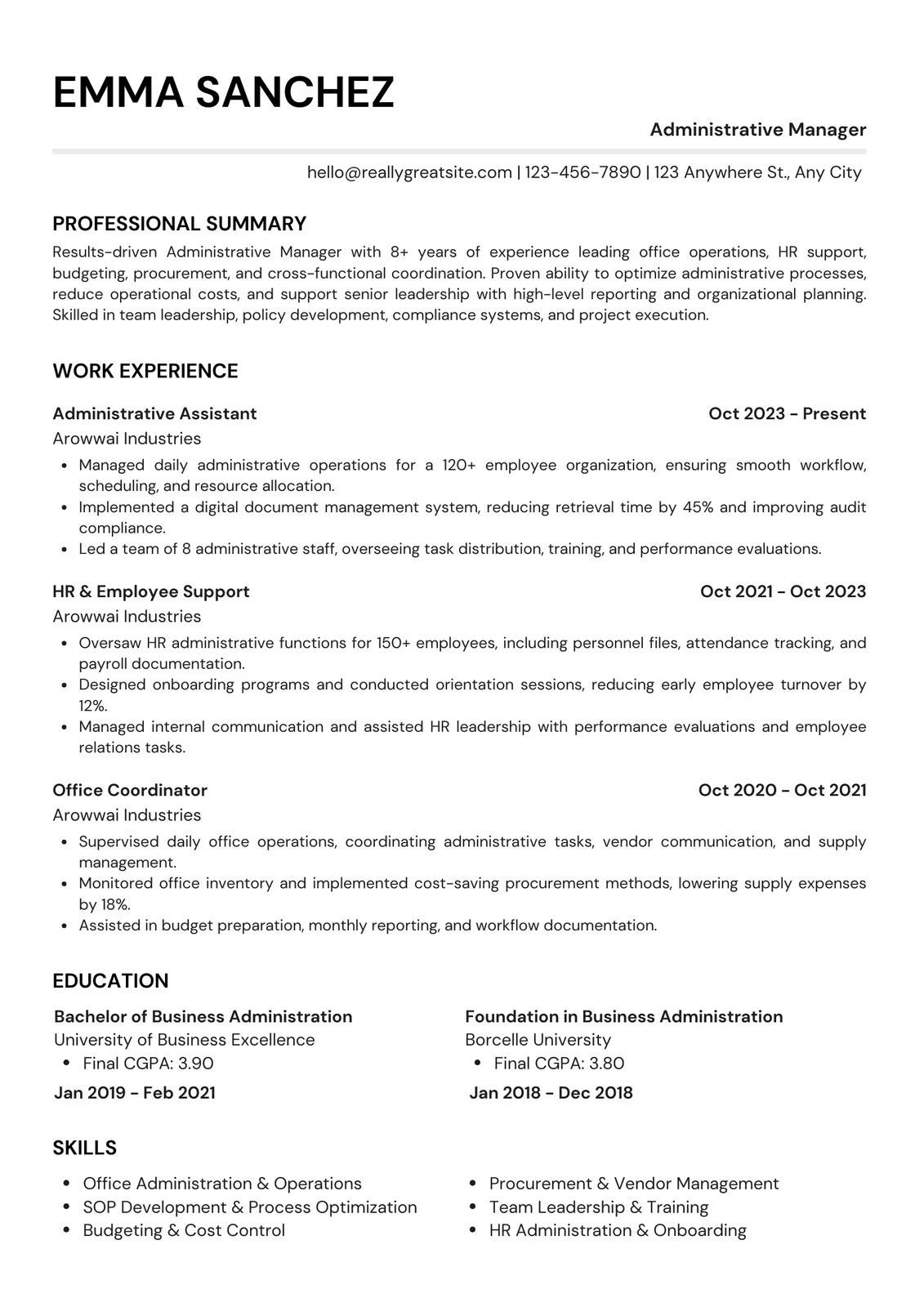
Classic ATS-Friendly Resume Example
Use Classic when you want the most conventional structure. It gives work experience the strongest visual priority and uses familiar section names throughout.
The instructional version prompts the user to define a target role, write a concise summary, use action-oriented bullets, add measurable outcomes when known, and include only relevant skills and optional sections.
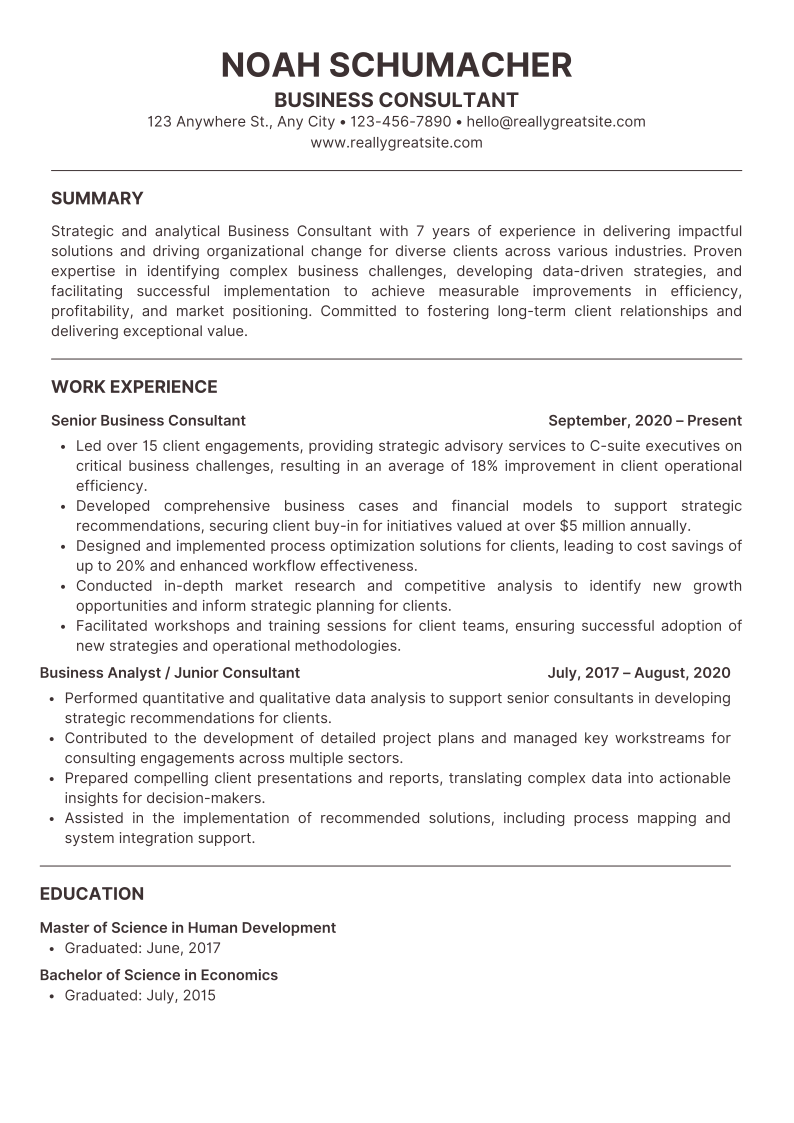
Professional ATS-Friendly Resume Example
Use Professional when you want a compact document that still gives experience, education, projects, and skills distinct visual space. It is particularly useful when you have enough content to need strong hierarchy but do not want the resume to feel dense.
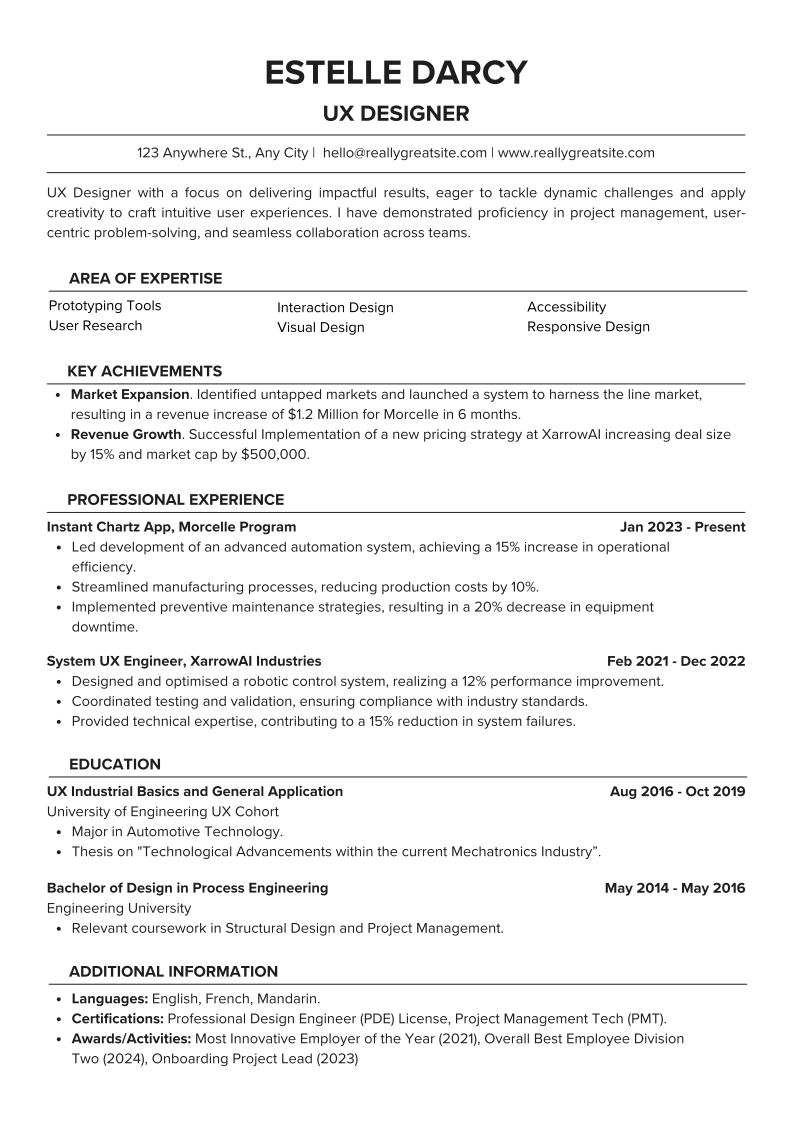
Modern ATS-Friendly Resume Example
Use Modern when you want a more contemporary appearance. Keep the public version's section names conventional — for example, use Skills instead of Area of Expertise and Work Experience instead of more creative substitutes — so the visual design does not add unnecessary ambiguity.
Why Built-In Writing Guidance Matters More Than Another Blank Template
A blank resume template solves a page-design problem. It does not solve the harder problem: deciding what evidence belongs on the page.
Our own analysis records repeatedly flagged issues that layout alone cannot repair — unclear target roles, vague summaries, task-only experience, weak measurable evidence, poor keyword alignment, and missing supporting proof. The templates therefore use prompts that actively push the user toward better decisions.
Template prompt
[TARGET JOB TITLE | 2–3 CORE SKILLS OR SPECIALTIES]
Problem it is designed to prevent
A generic or missing professional direction.
Template prompt
[Write 3–4 lines summarising your experience, strongest skills, industry knowledge, and 1–2 measurable achievements.]
Problem it is designed to prevent
A generic summary that does not explain fit.
Template prompt
[Start with a strong action verb. Describe what you did, how you did it, and the result.]
Problem it is designed to prevent
Task-only experience bullets.
Template prompt
[Include numbers where possible — %, revenue, users, time saved, cost reduced, projects completed, etc.]
Problem it is designed to prevent
Achievements with no context for scale or outcome.
Template prompt
[Another keyword appearing in the job description that genuinely matches your experience]
Problem it is designed to prevent
Keyword stuffing or unsupported skills.
Template prompt
[Project / Portfolio URL — optional]
Problem it is designed to prevent
Missing evidence for portfolio-driven roles when a relevant public link exists.
Template prompt
Problem it is designed to prevent
[TARGET JOB TITLE | 2–3 CORE SKILLS OR SPECIALTIES]
A generic or missing professional direction.
[Write 3–4 lines summarising your experience, strongest skills, industry knowledge, and 1–2 measurable achievements.]
A generic summary that does not explain fit.
[Start with a strong action verb. Describe what you did, how you did it, and the result.]
Task-only experience bullets.
[Include numbers where possible — %, revenue, users, time saved, cost reduced, projects completed, etc.]
Achievements with no context for scale or outcome.
[Another keyword appearing in the job description that genuinely matches your experience]
Keyword stuffing or unsupported skills.
[Project / Portfolio URL — optional]
Missing evidence for portfolio-driven roles when a relevant public link exists.
ATS-Friendly CV Template: When CV and Resume Mean the Same Thing
In many job markets, employers use CV and resume to mean the same concise job-application document. If that is how the employer uses the term, the same ATS principles on this page apply: clear text, recognizable sections, consistent dates, relevant terminology, and evidence that supports the target role.
That means the Classic, Professional, and Modern downloads can also be used as ATS-friendly CV templates for ordinary job applications. Replace the instructional prompts with your own information and follow the employer's requested file format.
An academic CV is different. Academic applications can require publications, research, teaching, grants, presentations, and a much longer career record. Do not force an academic CV into a one- or two-page resume structure simply to make it look like a standard job resume.
If the employer means...
CV = normal job-application document
Use this approach
Use the same ATS-friendly structure and tailoring principles as a resume.
If the employer means...
Academic or research CV
Use this approach
Use an academic CV structure built around research, publications, teaching, grants, and scholarly work.
If the employer means...
The posting gives its own format requirements
Use this approach
Follow the employer's instructions even if they differ from generic resume advice.
If the employer means...
Use this approach
CV = normal job-application document
Use the same ATS-friendly structure and tailoring principles as a resume.
Academic or research CV
Use an academic CV structure built around research, publications, teaching, grants, and scholarly work.
The posting gives its own format requirements
Follow the employer's instructions even if they differ from generic resume advice.
ATS-Friendly Resume Template for Microsoft Word
Each template is available as an editable Microsoft Word .docx file. Replace the bracketed guidance with your own information, remove optional sections that do not strengthen the application, and keep the layout structure intact while editing.
Microsoft's own resume-template guidance uses the same basic workflow: choose a template and replace placeholder text with your information. For these ATS-focused versions, the placeholders go further by explaining what evidence belongs in the section instead of merely showing sample content.
When saving the finished resume, use a professional filename such as FirstName_LastName_Resume.docx or the employer's requested naming convention.
Use the .docx file when the employer explicitly requests Word.
Do not leave any bracketed instructions in the final resume.
Keep dates, bullet styles, and heading formatting consistent.
Re-open the final file before submitting to confirm nothing shifted during editing.
You can use the Word versions in Google Docs without rebuilding the resume from scratch. Google officially supports uploading Microsoft Word files to Drive, opening them with Google Docs, and converting them to Google Docs format.
For the cleanest user experience, JobResumeAI should eventually publish dedicated 'Make a copy' Google Docs links for Classic, Professional, and Modern. Until those copies are live, the .docx download is the source template: upload it to Google Drive, open it with Google Docs, review spacing and page breaks, then replace the instructions with your own content.
1
Download the Word template
Choose Classic, Professional, or Modern and save the .docx file.
2
Upload the file to Google Drive
In Drive, choose New → File upload and select the downloaded .docx file.
3
Open with Google Docs
Right-click the Word file and choose Open with → Google Docs.
4
Review the converted formatting
Check line breaks, spacing, bullets, and page length before editing content.
5
Replace every placeholder
Use only information that is true for your background and delete sections that do not apply.
PDF or DOCX for ATS? Follow the Application, Not a Myth
There is no honest universal rule that PDF is always better or DOCX is always better. Greenhouse currently supports .doc, .docx, .pdf, .rtf, and .txt candidate uploads. Lever's current resume-parsing documentation also supports common Word and PDF formats.
The practical rule is simple: follow the employer's instruction first. When more than one file type is accepted, use a true text-based document that preserves the intended reading order and verify the final export before uploading.
Application says
PDF required
Use
PDF
Application says
DOC or DOCX required
Use
The requested Word format
Application says
PDF or DOCX accepted
Use
Either clean text-based version; verify the final file before submitting
Application says
No clear file guidance
Use
Use a common accepted format and avoid image-only or corrupted exports
Application says
Use
PDF required
PDF
DOC or DOCX required
The requested Word format
PDF or DOCX accepted
Either clean text-based version; verify the final file before submitting
No clear file guidance
Use a common accepted format and avoid image-only or corrupted exports
An ATS-Friendly Template Still Needs Job-Relevant Keywords
A template cannot know which skills, tools, certifications, or responsibilities matter for the job you are targeting. That part has to come from the job description and your real background.
Workday describes ATS matching as more than raw word counting: modern systems can interpret resume information and compare skills and experience with job requirements. That is another reason not to treat keyword stuffing as a strategy.
Use exact job terminology when it accurately describes what you have done. If a requirement is not supported by your experience, leave it out rather than trying to manufacture a match.
1
Identify the job's required qualifications
Start with the must-haves, not every noun in the posting.
2
Match each important requirement to evidence
Connect the term to a real job, project, result, certification, or skill.
3
Place the term where the evidence lives
Experience and project bullets are often stronger than an isolated keyword list.
4
Use the skills section for scanning
Prioritize relevant skills you can actually defend in an interview.
5
Remove unsupported terminology
A lower match with truthful evidence is better than a higher match built on false claims.
Write Experience Bullets That Show Contribution, Not Just Activity
One of the clearest patterns in our analysis records was experience that described tasks without explaining what the candidate changed, improved, delivered, solved, or supported.
This aligns closely with Yale's career guidance. Yale recommends accomplishment statements that focus on action, project/context, and result, and encourages quantifying impact when possible.
The important distinction is credibility. Quantification should clarify real work, not create fake precision. If you know that a process saved four hours per week, say it. If you only know that you automated the manual step and reduced repeated work, describe that concrete outcome instead.
Task only
“Responsible for weekly customer reports and helping the operations team.”
Evidence-focused direction
“Prepared weekly customer-health reports from CRM data and highlighted accounts requiring follow-up before operations reviews.”
ATS-Friendly Resume Builder: When a Template Is Not Enough
A downloadable template is ideal when you want full manual control. But the harder part of applying is often not the layout — it is deciding which experience to emphasize for a specific job.
JobResumeAI's builder can use your existing resume and the target job description to help prepare a focused version for you to review. The template controls presentation; the tailoring workflow helps you make relevant experience, skills, and evidence easier to find.
Use a template when…
You already know what content you want to write
Use the builder when…
You want help comparing your existing resume with a target job
Use a template when…
You prefer editing manually in Word or Google Docs
Use the builder when…
You want suggestions for clearer, more relevant wording
Use a template when…
You need a clean structure quickly
Use the builder when…
You want to review missing or weakly represented job requirements
Use a template when…
You are comfortable tailoring each application yourself
Use the builder when…
You want a faster starting point for job-specific versions
Use a template when…
Use the builder when…
You already know what content you want to write
You want help comparing your existing resume with a target job
You prefer editing manually in Word or Google Docs
You want suggestions for clearer, more relevant wording
You need a clean structure quickly
You want to review missing or weakly represented job requirements
You are comfortable tailoring each application yourself
You want a faster starting point for job-specific versions
This page deliberately avoids claims that sound good in marketing but cannot be defended across every employer and recruiting system.
We do not promise that one template will 'pass' every ATS.
We do not claim a universal ATS score exists.
We do not recommend a magic keyword density.
We do not claim PDF is always better than DOCX or vice versa.
We do not claim a simple layout can compensate for irrelevant experience.
We do not recommend hidden keywords or unsupported skills.
We do not claim every resume needs projects, certifications, awards, references, or a summary.
We do not claim that a template can guarantee an interview.
Common questions
ATS-Friendly Resume Template FAQ
Straight answers without universal ATS guarantees or made-up keyword rules.
An ATS-friendly resume template is a resume layout designed to keep important information easy to extract and easy to read. A useful template uses clear text, recognizable sections, consistent job and date formatting, and avoids making critical information depend on graphics or complex layout. The content still needs to be relevant to the job.
Further reading
Sources and references
These references were reviewed while preparing this guide. JobResumeAI may interpret or organize the guidance differently; the links below let you check the underlying advice yourself.