
ATS Parsing: How Greenhouse, Lever and Workday Read Your Resume
Learn how ATS parsing works in Greenhouse, Lever and Workday, what causes parse errors, and how to test and fix your resume file before you apply.
Quick answer
ATS parsing is the step where software reads your resume file and fills in a profile.
When you apply, many hiring systems read your file and pull out your name, job titles, dates and schools. This step is called ATS parsing. If it fails, a recruiter can see a blank or wrong profile, even when your resume looks fine on screen.
Most problems are easy to avoid. Use a text based PDF or DOCX, one column, plain headings and contact details in the main body. Then test the file before you apply.
- Greenhouse says it cannot parse resumes larger than 2.5 MB. It also lists columns, tables, headers, footers, text boxes and image files as common causes of partial parses.
- Lever cannot read image files such as JPG or PNG. Its help page suggests highlighting text with your cursor as a quick test.
- Workday career sites are set up by each employer. Read the file rules on the page where you apply.
- After you upload, check the filled in fields and fix any that are wrong.
On this page
What ATS parsing is, in plain words
Parsing is how a hiring system turns your file into fields it can store.
An applicant tracking system, or ATS, stores job applications. Parsing is how it turns your file into fields it can use. Those fields usually include your name, contact details, job titles, employers, dates, school and skills.
The software that does this work is called an ATS parser. It reads the text in your file. Then it sorts that text into the right boxes on your profile.
You are likely to meet one of these systems. Jobscan's 2026 report found a detectable ATS at 487 of the 500 Fortune 500 companies, or 97.4%. Over 40% of those companies used Workday. In Jobscan's wider data from 13,130 companies, the most common systems were these:
- System
- Greenhouse
- Share of companies in Jobscan's wider data
- 19.0%
- System
- Workday
- Share of companies in Jobscan's wider data
- 17.5%
- System
- Lever
- Share of companies in Jobscan's wider data
- 15.6%
| System | Share of companies in Jobscan's wider data |
|---|---|
| Greenhouse | 19.0% |
| Workday | 17.5% |
| Lever | 15.6% |
Why a parse error can cost you attention
A parse error is not a rejection, but it can leave your profile thin.
A parse error does not mean you are rejected. It means the system could not fill in your profile on its own. Greenhouse calls this an unsuccessful resume parse. The resume is only attached to the candidate, and a person has to type the details in by hand.
That extra work matters because recruiters often search by skills. Jobscan's State of the Job Search report says 76.4% of surveyed recruiters look for and sort candidates using skills from the job posting. A profile with missing or wrong fields gives those searches less to find.
Layout trouble was not common in our own data. Of 2,225 detailed resume checks, 96.2% passed JobResumeAI's formatting safety check and 3.8% did not. The same study found a median keyword match of 25%. So parsing is one step, and matching the job is another. We cover the second step later in this guide.
How an ATS parser reads your file, step by step
Most parsers follow the same general path from file to profile.
Parsers differ from one product to the next. The steps below describe the general path. They are not the code of any one system.
- 1
It reads the text in the file
The parser pulls the words out of your PDF or DOCX. A picture of text has no words to pull, so there is nothing to read.
- 2
It finds the sections
It looks for headings such as Experience, Education and Skills. Clear headings help it split the page in the right places.
- 3
It looks for details
It looks for a name, an email, a phone number, job titles, employer names, dates and schools.
- 4
It fills the profile
It puts what it found into fields on the candidate profile. Lever lists name, organization and contact details as examples.
- 5
It keeps your file
Your original file stays with the profile. Lever keeps resumes that come with an application in a resume area on the candidate profile. Greenhouse attaches the file even when parsing fails.
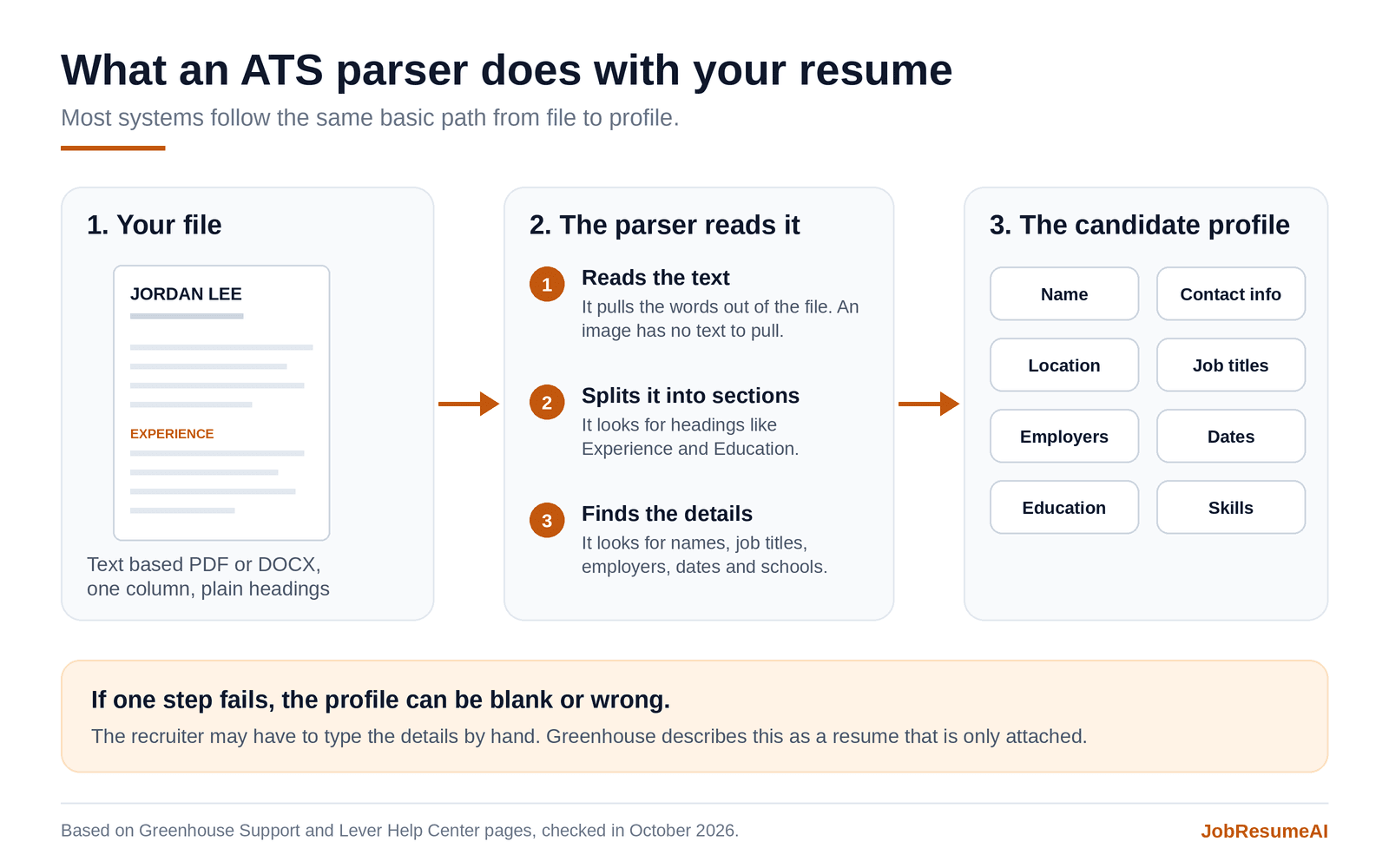
A general view of how a parser turns a resume file into profile fields. Real products differ in the details.
What can break ATS resume parsing
Greenhouse publishes a list of layout problems that can cause a failed or partial parse.
Greenhouse lists the resume problems that can cause a failed or partial parse. The list is a useful guide to ATS resume layout, even if you apply through another system.
The Greenhouse page is written for recruiters. It describes how the parser behaves. It is not a promise about every application form. Treat it as a strong hint, not a rule.
- Layout choice
- Name or contact details in a header, footer or text box
- What the help pages say
- Greenhouse lists this as a formatting issue
- Safer choice
- Put contact details in the main body at the top of page one
- Layout choice
- Two or more columns
- What the help pages say
- Greenhouse lists a columned layout as a formatting issue
- Safer choice
- Use one column that reads from top to bottom
- Layout choice
- Tables, headers and footers
- What the help pages say
- Greenhouse names complex layouts built with tables, headers or footers
- Safer choice
- Use plain lines and bullet points
- Layout choice
- Photos, graphics or word art
- What the help pages say
- Greenhouse lists these as formatting issues
- Safer choice
- Leave them out, or keep key details out of them
- Layout choice
- Resume saved as an image
- What the help pages say
- Greenhouse and Lever both say image files are a problem
- Safer choice
- Export a text based PDF or DOCX
- Layout choice
- Spaces between letters
- What the help pages say
- Greenhouse says the parser cannot read the letters as one word
- Safer choice
- Type headings in normal text
- Layout choice
- Unclear sections
- What the help pages say
- Greenhouse lists resumes without clear sections and with mixed formats
- Safer choice
- Use plain headings and one format throughout
- Layout choice
- Short titles and company names
- What the help pages say
- Greenhouse names titles like Sr. Account Exec and companies without Inc., Co., LTD or LLC
- Safer choice
- Write full titles and company names
- Layout choice
- File over 2.5 MB
- What the help pages say
- Greenhouse says it cannot parse larger resumes
- Safer choice
- Remove large images and export again
| Layout choice | What the help pages say | Safer choice |
|---|---|---|
| Name or contact details in a header, footer or text box | Greenhouse lists this as a formatting issue | Put contact details in the main body at the top of page one |
| Two or more columns | Greenhouse lists a columned layout as a formatting issue | Use one column that reads from top to bottom |
| Tables, headers and footers | Greenhouse names complex layouts built with tables, headers or footers | Use plain lines and bullet points |
| Photos, graphics or word art | Greenhouse lists these as formatting issues | Leave them out, or keep key details out of them |
| Resume saved as an image | Greenhouse and Lever both say image files are a problem | Export a text based PDF or DOCX |
| Spaces between letters | Greenhouse says the parser cannot read the letters as one word | Type headings in normal text |
| Unclear sections | Greenhouse lists resumes without clear sections and with mixed formats | Use plain headings and one format throughout |
| Short titles and company names | Greenhouse names titles like Sr. Account Exec and companies without Inc., Co., LTD or LLC | Write full titles and company names |
| File over 2.5 MB | Greenhouse says it cannot parse larger resumes | Remove large images and export again |
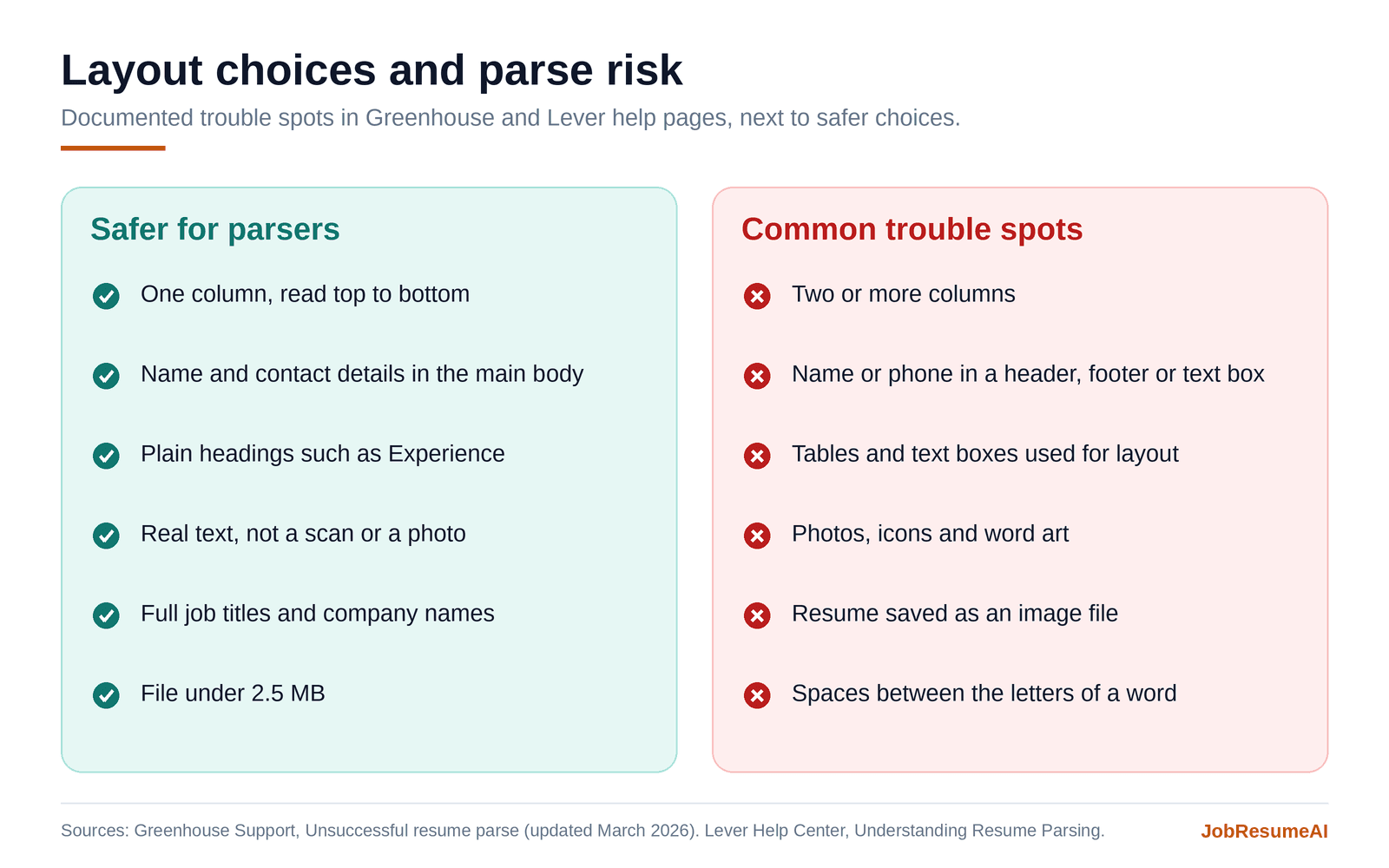
Safer choices next to the layout problems named in Greenhouse and Lever help pages.
Can an ATS read tables, columns and text boxes?
Some systems cope with these layouts and some do not.
People often ask about these items one at a time. The short answer is that some systems cope and some do not. You cannot know which system an employer uses, so the lower risk choice is the same each time.
Can ATS read tables?
Greenhouse lists complex resumes with tables as a cause of partial parses. When text sits in cells, the reading order may not match what you see on the page. Use plain lines and bullet points for skills and dates.
Can ATS read columns?
Greenhouse lists a columned layout as a formatting issue. In a two column design, a sidebar can end up mixed with your main text. One column avoids that risk.
Can ATS read text boxes?
Greenhouse names text boxes as a problem when your name and contact details sit inside one. Text in a box can sit outside the normal flow of the page. Keep key details in regular paragraphs.
Can ATS read headers and footers?
Greenhouse lists contact details in a header or footer as a formatting issue. Some people place their name there so it repeats on every page. Put it in the main body instead.
Can ATS read icons and images?
Lever cannot parse image files such as JPG or PNG. Greenhouse lists graphics, photos and word art as formatting issues. If you use small icons, also write the details as plain text.
PDF vs Word resume: which file format is safer?
Follow the application first. Then choose the file that stays clean after export.
Start with the application. If it asks for PDF, send PDF. If it asks for DOCX, send DOCX. The employer's instruction matters more than general advice about resume file format.
If either is accepted, the file type matters less than what is inside it. A PDF saved from Word or Google Docs holds real text. A scan or a photo of a page does not. Lever suggests a simple test. Try to select the text with your cursor.
So, should a resume be PDF or Word? Greenhouse and Lever both accept both. Choose the version that stays clean after export, and check it with the steps later in this guide.
- System
- Greenhouse
- File types its help pages list
- DOC, DOCX, PDF, RTF and TXT
- Size limits its help pages list
- Uploads up to 100 MB. Parsing stops above 2.5 MB.
- System
- Lever
- File types its help pages list
- Microsoft Word (including DOCX), PDF and RTF. Image files such as JPG and PNG cannot be parsed.
- Size limits its help pages list
- Resume uploads up to 10 MB.
- System
- Workday
- File types its help pages list
- Set by each employer
- Size limits its help pages list
- Set by each employer
| System | File types its help pages list | Size limits its help pages list |
|---|---|---|
| Greenhouse | DOC, DOCX, PDF, RTF and TXT | Uploads up to 100 MB. Parsing stops above 2.5 MB. |
| Lever | Microsoft Word (including DOCX), PDF and RTF. Image files such as JPG and PNG cannot be parsed. | Resume uploads up to 10 MB. |
| Workday | Set by each employer | Set by each employer |
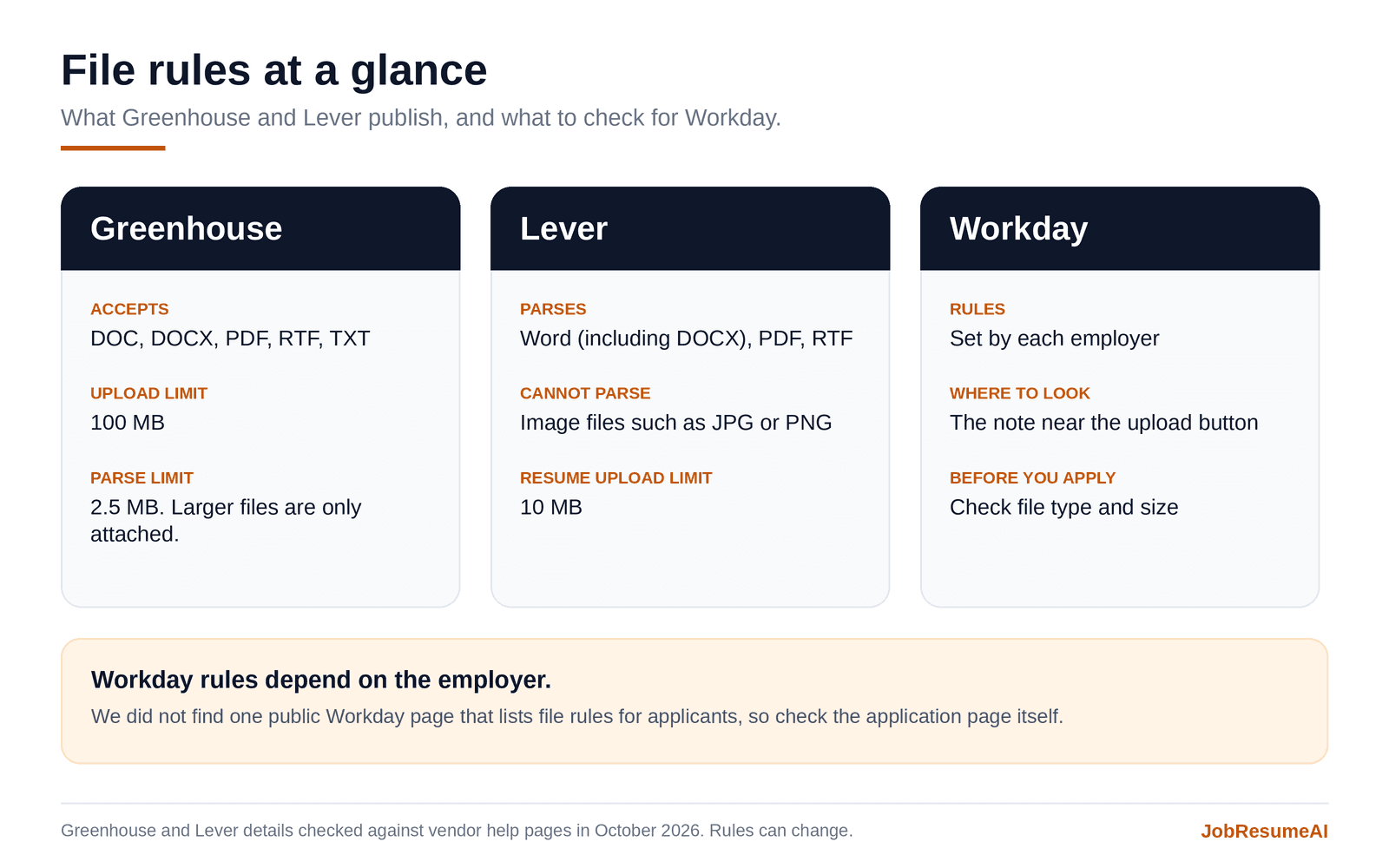
File details from Greenhouse and Lever help pages, checked in October 2026. Workday rules vary by employer.
Greenhouse, Lever and Workday: what to know for each
Each help page says something different. Here is what each source says, and what we could not confirm.
The three systems share the same basic idea. Their help pages and setups differ. Below is what each source says, and where we could not find an answer.
Greenhouse resume parsing
Greenhouse gives the most detail. When a resume parses, a success message shows at the top of the page. When it does not, the screen tells the recruiter the file was attached but not read, and the recruiter fills in the fields by hand.
Its help page also says a parse can be partial. Some fields fill in while others are skipped. That is why it helps to check each field, not just the file. Greenhouse last updated the page in March 2026.
Lever resume parsing
Lever says its parser adds details such as name, organization and contact details to the candidate profile. It lists Word, PDF and RTF as the file types it can parse. It cannot parse image files. For scanned files, Lever suggests converting them first, for example with Adobe Acrobat or Google Drive.
Lever's page also gives a quick test. Drag your cursor over the text in the file. If it will not highlight, the file may not be parseable.
Workday resume uploads and autofill
Workday was the most used system among Fortune 500 companies in Jobscan's 2026 report. We could not find one public Workday page that lists file rules for applicants. Employers set up their own Workday career sites, so rules can differ.
Employer guides often mention an Autofill from Resume option. Colorado State University Pueblo's Workday applicant guide recommends PDF files and points to that option. It also tells applicants to review each entry before they submit.
If Workday's resume parser fills a field wrong, fix it by hand before you submit. Treat the autofill as a draft.
How to test your resume for ATS parsing
You cannot see what a recruiter sees, but you can catch most problems at home.
Think of this as a home resume parser test. It will not copy any one system. It can still show the problems that vendors name. Use your final file.
- 1
Open the final file
Use the PDF or DOCX you plan to send. Do not test an older draft.
- 2
Try to highlight text
In a PDF, drag your cursor across a few lines. If you cannot select the words, the file may be an image.
- 3
Copy and paste into a plain text editor
Select all, copy, and paste into Notepad or a plain text window. This strips the design and shows the order of the text.
- 4
Read the pasted text from top to bottom
Look for your name first, then contact details, then sections in order. Watch for broken lines, missing words and odd symbols.
- 5
Check the file size
Keep the file well under 2.5 MB. Large images are the usual reason a resume is big.
- 6
Compare the resume with the job
Run the resume against the job description and review the gaps. Add a term only if it is true for you.
Try the resume parse risk checker
Answer a few questions about your file to see what to fix first.
Answer each question about your file. The checker lists what to fix first. It runs in your browser and does not upload your resume.
It is a self check based on problems that vendors document. It cannot tell you how a specific employer's system will read your file.
Download the parse test checklist and field log
Two simple tools you can use while you prepare and after you upload.
Print the checklist while you prepare your file. Open the CSV in a spreadsheet and fill it in after you upload. The copy lines below show what parse friendly text can look like.
How to fix the most common parsing problems
Most fixes take a few minutes. Start with the ones Greenhouse names.
Start with the changes that Greenhouse names, because they are the most likely to matter.
Move your name and contact details out of the header and into the body. Switch to one column. Replace tables with plain lines. Turn text boxes into normal paragraphs. Remove photos and word art. Retype any spaced out headings in normal text.
Then check the details a parser looks for. Write job titles in full. Write company names as the employer writes them, including Inc. or LLC when it is part of the name. Use real details instead of placeholder text.
Last, export the file again from your editor. Save a PDF from Word or Google Docs instead of scanning a printed page. Check the size. If the file is near 2.5 MB, remove large images.
Harder to parse
“Sr Acct Exec, Northline, 21 to now”
Easier to parse
“Senior Account Executive | Northline Logistics, Inc. | Austin, TX | Mar 2021 to Present”
After the file reads cleanly, check the match
A clean parse gets your details in. It does not show you fit the job.
A clean parse gets your details into the system. It does not show that your resume fits the job. The next step is to compare your wording with the job description.
In our study of 2,225 detailed checks, 96.5% had at least one term that JobResumeAI did not find in the resume. The median keyword match was 25%. A missing term can point to a wording gap or to a real gap in experience. Add a term only when it is true for you.
Try the quick scan below on a job posting. Use the result as a starting point, not as a list to copy.
Common questions about ATS parsing
What is ATS parsing?
ATS parsing is the step where a hiring system reads your resume file and fills in profile fields such as name, job titles, dates and education. The software that does this is called an ATS parser.
Can ATS read PDF files?
Yes, when the PDF holds real text. Greenhouse and Lever both list PDF as a supported type. A scan or a photo of a page is an image, and Lever says it cannot parse image files.
Should a resume be PDF or Word?
Follow the application. If it accepts both, use the one that stays clean after export and passes the copy and paste test. Neither type is safe if the layout relies on columns, tables or text boxes.
Can ATS read my resume?
Often it can, but you cannot see the recruiter's view. Use the copy and paste test, check the file size, and review the filled in fields after you upload.
What does unsuccessful resume parse mean?
It is Greenhouse's term for a resume the parser could not turn into fields. The resume is attached to the profile, and a recruiter types the details by hand. Greenhouse shows the message in its recruiter tools.
Does a parse error mean my application is rejected?
No. Greenhouse describes it as details that could not be filled in automatically. A recruiter then enters them by hand. It can still add friction, so it is worth avoiding.
Why is my resume not uploading?
Common causes are a file type the form does not accept, a file that is too large, and an employer limit on uploads. Check the accepted types and size near the upload button. Rename the file using plain letters, export it again and try another browser. These are common causes, not a full list. If it still fails, contact the employer.
Do I need a different resume for each ATS?
Usually no. A clean, one column, text based file is a safer base for Greenhouse, Lever and Workday. What you change for each job is the content, such as your summary, skills and bullet points.
How can I check what the ATS read?
Some career sites show the filled in fields before you submit, such as autofill on Workday sites. Compare each field with your resume. The CSV log in this guide gives you a list to work from.
What this guide cannot tell you
Here is what is known and what is not.
We want to be clear about what we know and what we do not.
- Vendor help pages describe how a parser works in general. Employers can set up their own forms, so your result can differ.
- The Greenhouse page we cite is written for recruiters. It is not a promise about each application form.
- We could not find one public Workday page with file rules for applicants.
- Jobscan's numbers come from career page scans and scans by its own users. They show how common each system is, not how any one employer uses it.
- JobResumeAI's numbers come from a self selected set of resume checks. They are diagnostic flags, not employer hiring results.
- Vendors update their help pages. We checked them in October 2026.
Parse check before you submit
- Did you use the file type the application asks for?
- Can you highlight the text in your PDF with your cursor?
- Is the file well under 2.5 MB?
- Are your name, phone and email in the main body of page one?
- Does the resume use one column, with plain headings?
- Are job titles and company names written in full?
- Did the copy and paste test read cleanly from top to bottom?
- After you upload, did you check each filled in field?
- Is every detail in the file true and yours?
Further reading
Sources and references
These references were reviewed while preparing this guide. JobResumeAI may interpret or organize the guidance differently; the links below let you check the underlying advice yourself.
- Greenhouse SupportUnsuccessful resume parse (opens in a new tab)
- Greenhouse SupportSupported formats for resumes, cover letters and other candidate uploads (opens in a new tab)
- Lever Help CenterUnderstanding Resume Parsing (opens in a new tab)
- Lever Help CenterAdding and deleting resumes (opens in a new tab)
- Jobscan2026 Applicant Tracking System (ATS) Usage Report (opens in a new tab)
- JobscanState of the Job Search Report (opens in a new tab)
- Colorado State University PuebloApplying for a Position in Workday (opens in a new tab)
- JobResumeAICommon ATS Resume Problems in 2026: What 2,226 Checks Found (opens in a new tab)